Approving token access for crypto assets (also known as virtual currencies) is an operation that is sometimes required when using DEXs, NFT marketplaces, and similar platforms. If this approval is left in place, the assets in your wallet could be at risk if a problem occurs with the smart contract you approved.
In fact, "Revoke.cash" maintains a list of hacking incidents in which unlimited token approvals were exploited, resulting in more than $494 million in stolen user funds since 2020 (Source: Revoke.cash). For example, in the Dolomite Hack discovered in March 2024, users who had left approvals in place on an old, no-longer-used contract were reportedly affected.
On March 20 2024, over $1.8m was stolen from users of an old version of DeFi protocol Dolomite. The exploit was found in an old contract that was deployed in 2019 and had since been discontinued. However, several users still had lingering approvals to this old contract, which the attacker was able to exploit to drain funds from their wallets.
To avoid falling victim to this kind of damage, it's important to check your approval status and revoke approvals as needed — especially for services you no longer use or approvals you don't recognize.
This article explains how to revoke crypto asset approvals using Revoke.cash, along with important points to know before revoking them.
What Revoking Means: Invalidating Approvals You Granted in the Past
Revoking is the act of invalidating token usage permissions that you previously granted to a DApp or smart contract. A DApp (decentralized application) is an application that runs on a blockchain, with DEXs and NFT marketplaces being typical examples.
For example, when swapping tokens on a DEX, you may be asked in advance to approve that "this service may move a certain amount of my specific token" — this approval is what's known as an approve. Once you revoke an approval, the approved party can no longer move the token in question.
An approval is not a setting stored only within your wallet. In most cases, the approval information is recorded on-chain in a smart contract. This means that simply disconnecting a site from a wallet like MetaMask does not necessarily revoke the approval itself.
To revoke unnecessary approvals, you need to use a tool that lets you check your approval status and then execute a revocation transaction on-chain.
How to Revoke Approvals Using "Revoke.cash"
One way to revoke approvals is to use "Revoke.cash."
First, go to Revoke.cash's official website. Before connecting your wallet, always make sure the URL is correct. Because fake sites that request wallet connections also exist, it's important to verify that you're on the official URL rather than clicking through carelessly from search results or ads (Official site: https://revoke.cash/ja)。
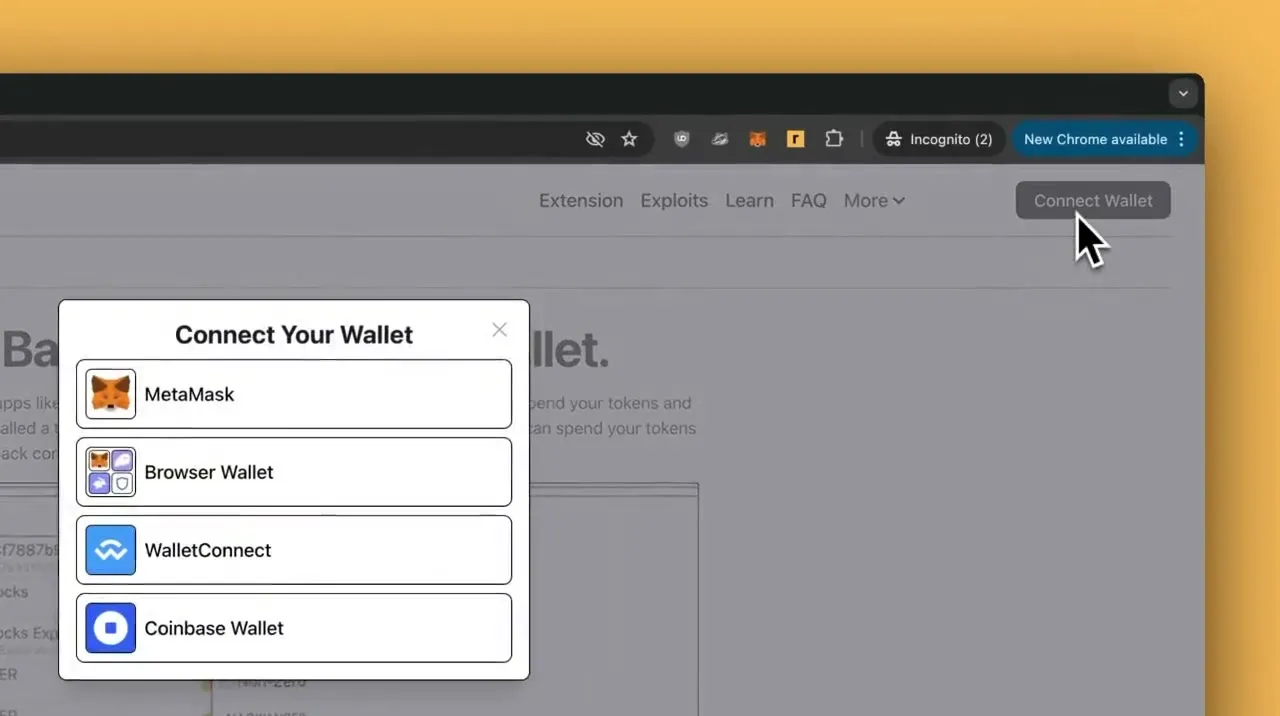
Once you've opened the official site, connect your wallet, such as MetaMask. When connecting, check the domain shown on the wallet's connection prompt. After confirming that the connection destination is Revoke.cash, approve the wallet connection.
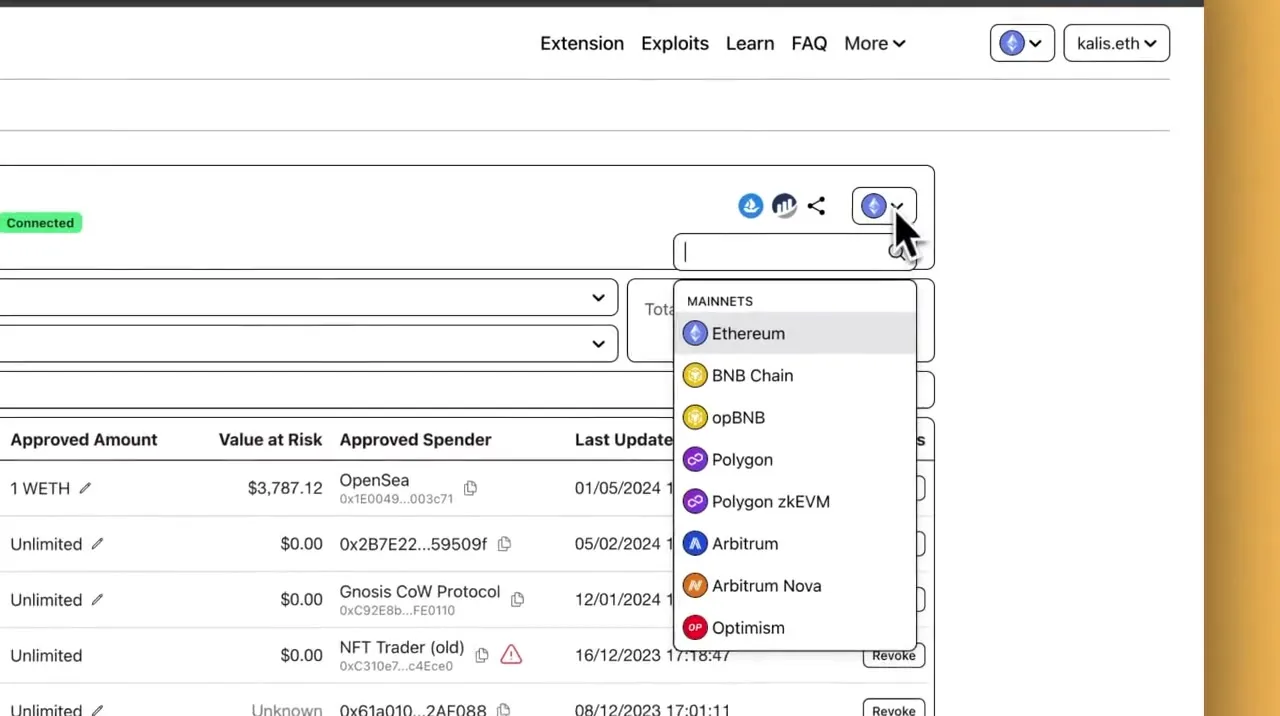
Next, select the network for which you want to check approvals. Approvals are managed separately for each network, such as Ethereum, Polygon, and BNB Chain. If you want to check approvals granted on Ethereum, select Ethereum; if you want to check approvals on Polygon, you need to select Polygon.
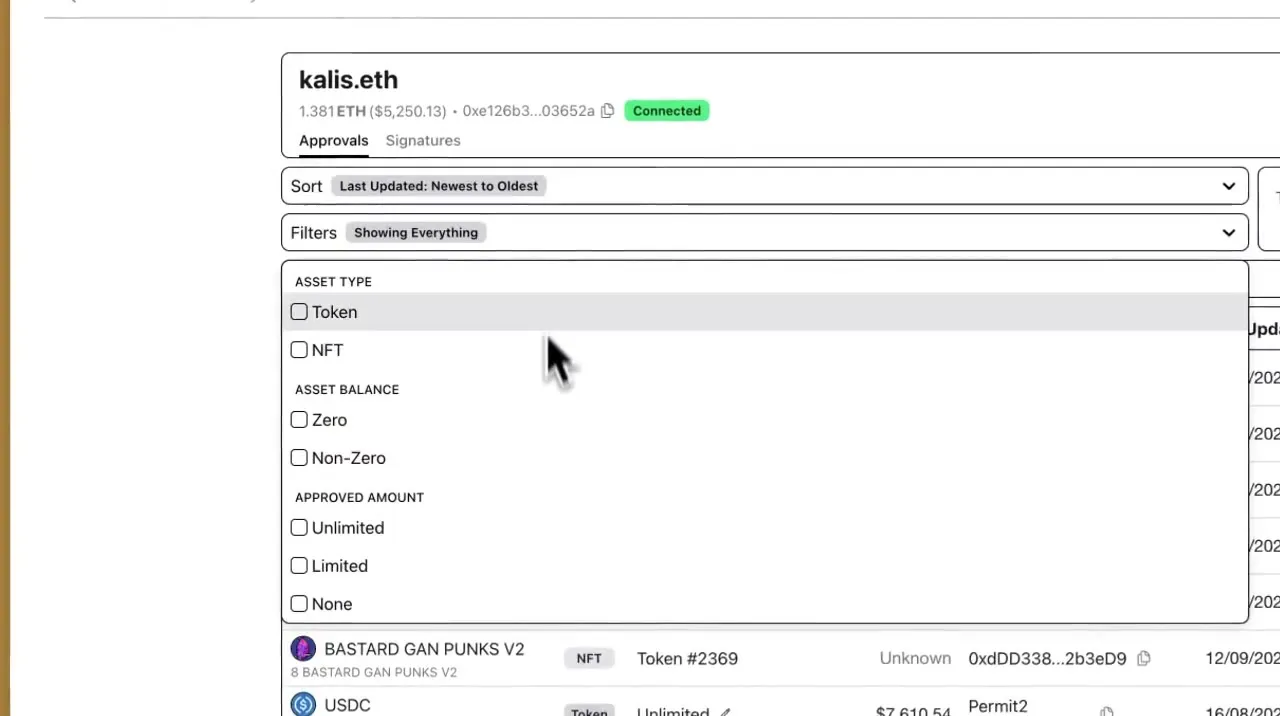
Once you select a network, you can check your approval status from the Tokens and NFTs lists. The Tokens list shows approvals related to crypto asset tokens, while the NFTs list shows approvals related to NFT collections. Check whether approvals remain for services you've used in the past or no longer use.
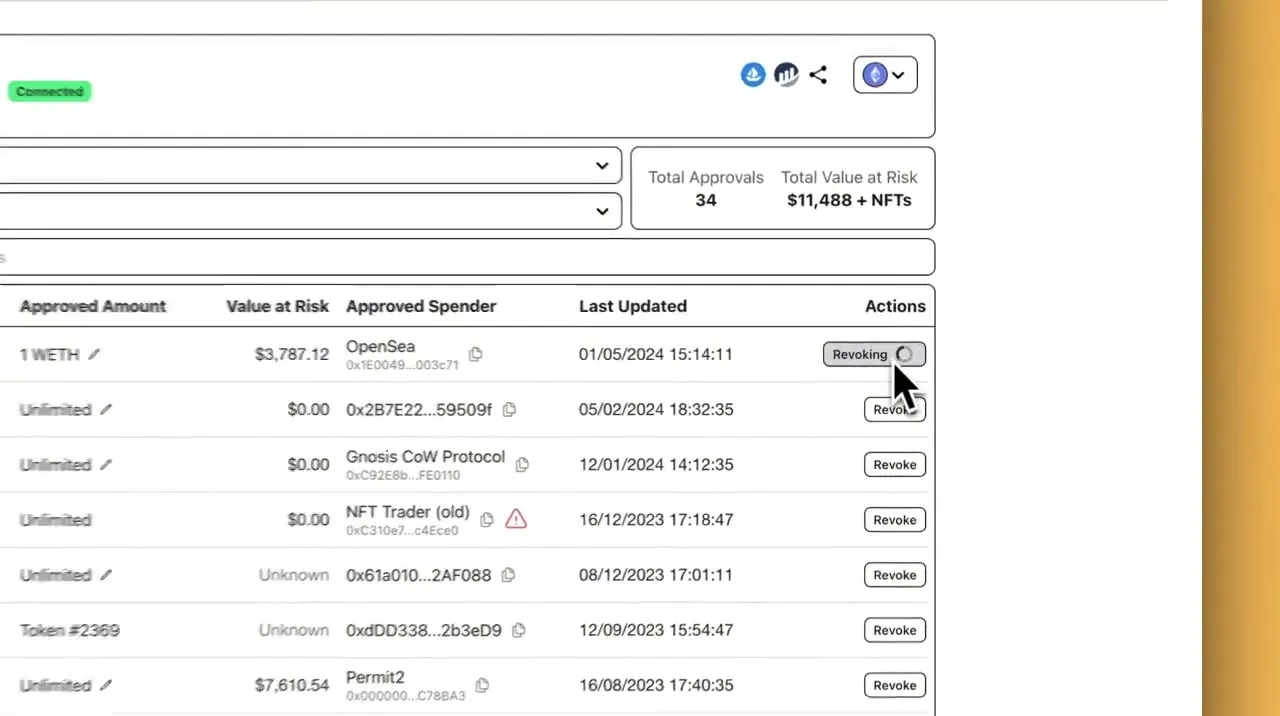
If you find an unnecessary approval, click the "Revoke" button (or the equivalent revocation button) displayed next to it. This will show the transaction details and gas fee in your wallet. If everything looks correct, approve the transaction in your wallet.
Once the transaction is complete, the approval is revoked. As a precaution, refresh the Revoke.cash screen and confirm that the approval has disappeared or that the approved amount has been set to zero.
Check the gas fee and transaction details, then approve
Confirm that the revocation has taken effect
In this way, Revoke.cash lets you check for approvals remaining across multiple networks and revoke the ones you no longer need. However, since a gas fee is charged each time you revoke an approval, there's no need to force yourself to revoke approvals for services you're still actively using.
Points to Know Before Revoking an Approval
Revoking approvals is one effective measure for improving your wallet's security. However, it can't resolve every kind of problem. Before revoking, it's important to understand what revoking cannot do.
It Doesn't Return Assets That Have Already Been Moved
Revoking is an action that prevents the approved party from moving your tokens going forward. In other words, it is not an action that can recover assets that have already been moved to a different address.
For example, if you approved a suspicious DApp and your tokens were subsequently moved, revoking the approval will not automatically return the tokens that were already moved. What revoking does achieve is preventing any further transfers using that same approval.
If ETH Is Stolen Immediately, Your Seed Phrase May Have Been Compromised
Revoking an approval requires a native token such as ETH to pay the gas fee. However, if ETH is drained from your wallet as soon as you deposit it, the problem may not simply be a matter of approvals.
In this situation, a "sweeper bot" that automatically moves assets out of your wallet may be operating. A sweeper bot is a mechanism that monitors assets deposited into a wallet and moves them to a different address immediately after deposit.
In this case, a third party may know your seed phrase or private key. If your seed phrase has been compromised, revoking approvals will not restore the security of the wallet itself. If any assets remain, it's advisable to review the situation and consider moving them to a new, secure wallet.
What to Do When Revoking Approvals Alone Isn't Enough to Ease Your Concerns
There are cases where concerns remain even after revoking an approval. In particular, if you have an approval you don't recognize, or if assets have already been moved, simply performing a revoke is not enough to assess the situation.
In such cases, you need to check not only your approval status but also your wallet's transaction history and where your assets were moved. Rushing through additional actions can lead to further mistakes, so it's important to check the situation one step at a time.
If You Find an Approval You Don't Recognize, Check Your Transaction History
If "Revoke.cash" shows an approval you don't recognize, first check your transaction history. Confirming when the approval was granted and to which service or smart contract makes it easier to assess the level of risk.
If you've used a DEX or NFT marketplace in the past, the approval from that time may still remain. On the other hand, if you find an approval granted to an unfamiliar site or suspicious contract, it's better to consider revoking it promptly.
However, judging safety based solely on the name of the approved party is risky. In some cases, the displayed name may be unclear, or an unfamiliar address may be shown. For this reason, it's important to check the token in question, the approved amount, the approval date and time, and the transaction history together.
If Assets Have Already Been Moved, Prioritize Confirming the Situation
If assets in your wallet have already been moved, you first need to determine what happened. While abuse of an approval is one possibility, other causes are also conceivable, such as a compromised private key or seed phrase, connecting to a fake site, or signing a malicious message.
In this case, what you should check is the type of asset moved, the destination address, the date and time of the transfer, and the action you took immediately beforehand. Checking these details makes it easier to determine whether the cause was abuse of an approval or a compromise of the wallet itself.
If assets remain, in some cases it is safer not to casually continue operating from the same wallet. In particular, if ETH is drained as soon as you deposit it, confirming the security of the wallet itself should take priority over revoking approvals.
If It's Difficult to Judge, Consider Consulting an Expert
Approval status and transaction history can be difficult for people unfamiliar with crypto assets to interpret. This is because, even when looking at an approved address or smart contract, it's often unclear whether it is safe.
Additionally, if assets have already moved, identifying the root cause becomes important. The appropriate response differs depending on whether the cause is an approval issue, a compromised seed phrase, or another signature or action.
If you're unable to judge the situation yourself, consulting an expert who can review your wallet's status and transaction history is also an option. In particular, if assets remain or you feel uncertain about further actions, it's important to organize the situation before continuing on your own judgment.
At Clabo, we review your wallet's approval status and transaction history and advise on how to respond based on your situation. If you have approvals or asset movements you don't recognize and find it difficult to judge on your own, please feel free to contact us.
Everyday Steps You Can Take to Reduce Approval Risk
Approvals are sometimes necessary when using DEXs, NFT marketplaces, and similar platforms. For this reason, rather than avoiding approvals entirely, it's important to manage them properly — using them only to the extent necessary and revoking them once they're no longer needed.
Here are some measures you can take on an ongoing basis to reduce the risks associated with approvals.
Don't Connect Your Wallet to Suspicious Sites
The most important step in reducing approval risk is not connecting your wallet to suspicious sites. Connecting to a fake airdrop site or a page disguised as an official site may result in being asked for dangerous approvals or signatures.
Before connecting your wallet, check the following:
Whether the URL is correct
Whether you're accessing it from the official site
Whether the link was sent to you via social media or a direct message
Neglecting these checks could, in the worst case, result in all of your assets being stolen. In particular, be cautious of sites that pose as free giveaways or limited-time campaigns, as these are sometimes used in scams targeting crypto assets.
Check the Details of a Signature or Approval Before Proceeding
When using a DApp, check the details of the signature or approval shown in your wallet before proceeding. Approving without checking the details can result in granting more permissions than you intended.
One thing to be especially cautious of is cases where the approved amount is set very high. Some services set a high upper limit so you don't need to approve every time. While this is convenient, it also increases the risk if a problem occurs with the approved party.
On the approval screen, check the token in question, the approved party, and the approved amount. If you don't understand the details, or if an unexpected approval is displayed, you should also be prepared to stop the operation.
Periodically Review Unnecessary Approvals
Approvals granted to DApps you've used in the past can remain in place even after you stop using them. For this reason, it's important to periodically check your approval status using a tool like "Revoke.cash" and revoke any unnecessary approvals.
That said, revoking approvals incurs a gas fee. Rather than mechanically revoking everything, it's a good idea to prioritize checking approvals you're not currently using, those with large approved amounts, and any that look suspicious.
Separate a Storage Wallet from a Wallet Used for DApps
It's also effective to separate the wallet used for storing high-value assets from the wallet used to interact with DApps. By avoiding DApp connections on your storage wallet and using a separate wallet for everyday transactions and NFT trading, you can more easily limit the scope of any potential damage.
For example, one approach is to keep long-term crypto holdings in a storage wallet and use a separate wallet containing only a small amount when using DEXs or NFT marketplaces — similar to separating a securities account for long-term holdings from one used for short-term trading, this involves dividing wallets according to purpose.
This approach doesn't reduce risk to zero. However, even if you make an approval mistake or connect to a suspicious site while using a DApp, it becomes harder for the assets in your storage wallet to be directly put at risk.
Summary: It's Important to Periodically Check and Revoke Unnecessary Approvals
Revoking an approval invalidates token usage permissions that you previously granted to a DApp or smart contract. Using "Revoke.cash," you can check the approval status remaining on your wallet and revoke any unnecessary approvals.
Revoking an approval does not return assets that have already been moved. Also, if ETH is stolen as soon as you deposit it, your seed phrase or private key may have been compromised, and revoking approvals alone may not be enough to address the problem.
To avoid falling victim to this kind of damage, it's important to consistently follow measures such as not connecting to suspicious sites, checking the details of signatures and approvals, and periodically reviewing unnecessary approvals.
If you have an approval you don't recognize, or if assets have already been moved, proceeding based on self-judgment alone could worsen the situation. In particular, if you're unsure how to interpret the approved party or transaction history, correctly identifying the root cause is important.
Whether you should revoke an approval or move to a new wallet is something that can't always be determined from the approval status alone. If you have an unrecognized approval or a suspicious asset transfer, please feel free to consult with Clabo.
This article is for informational purposes only and does not constitute financial or investment advice. Please consult a qualified professional before making investment decisions.