


Phishing scams targeting crypto assets (also known as virtual currencies) are no longer a rare problem that only affects a small group of people. In a survey we conducted, about 68% of crypto asset users said they had encountered a phishing scam or fake site. Another 16.89% said they "almost fell for it but noticed in time," and 4.05% said they had "actually gone through with the fraudulent action."
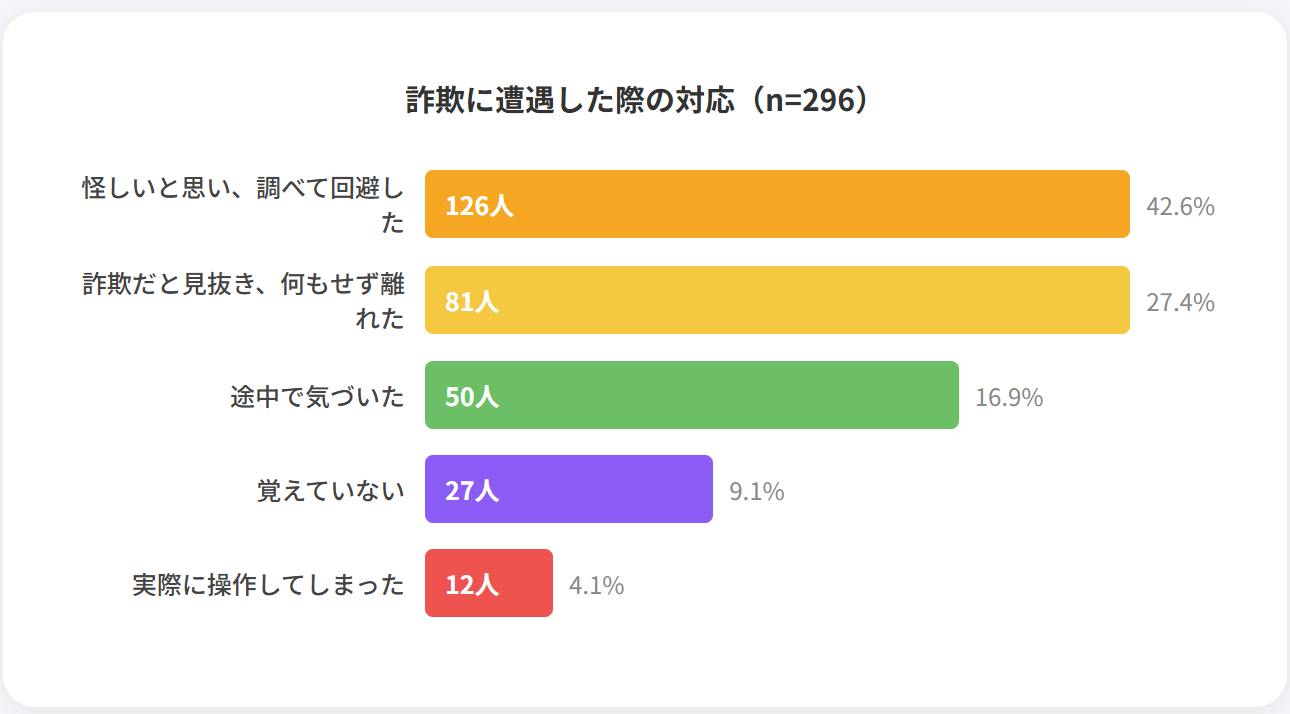
These incidents happen because fake sites and fraudulent emails have become increasingly convincing, making them hard for users to spot at a glance. In the same survey, 44.59% of respondents said one reason it is difficult to detect these scams is that "the content is sophisticated and feels natural."
For this reason, preventing crypto phishing scams takes more than simply trying to "spot something suspicious." You need to consistently avoid logging in through links in emails or SMS messages, always verify through the official website or official app, and never enter your recovery phrase or private key on a website.
This article explains what information is typically targeted in crypto phishing scams, common tactics used by scammers, how to protect yourself, and what to do if you suspect you have been targeted. If you hold crypto assets, use this as a checklist for when to pause before entering any information.
What Is Crypto Phishing?
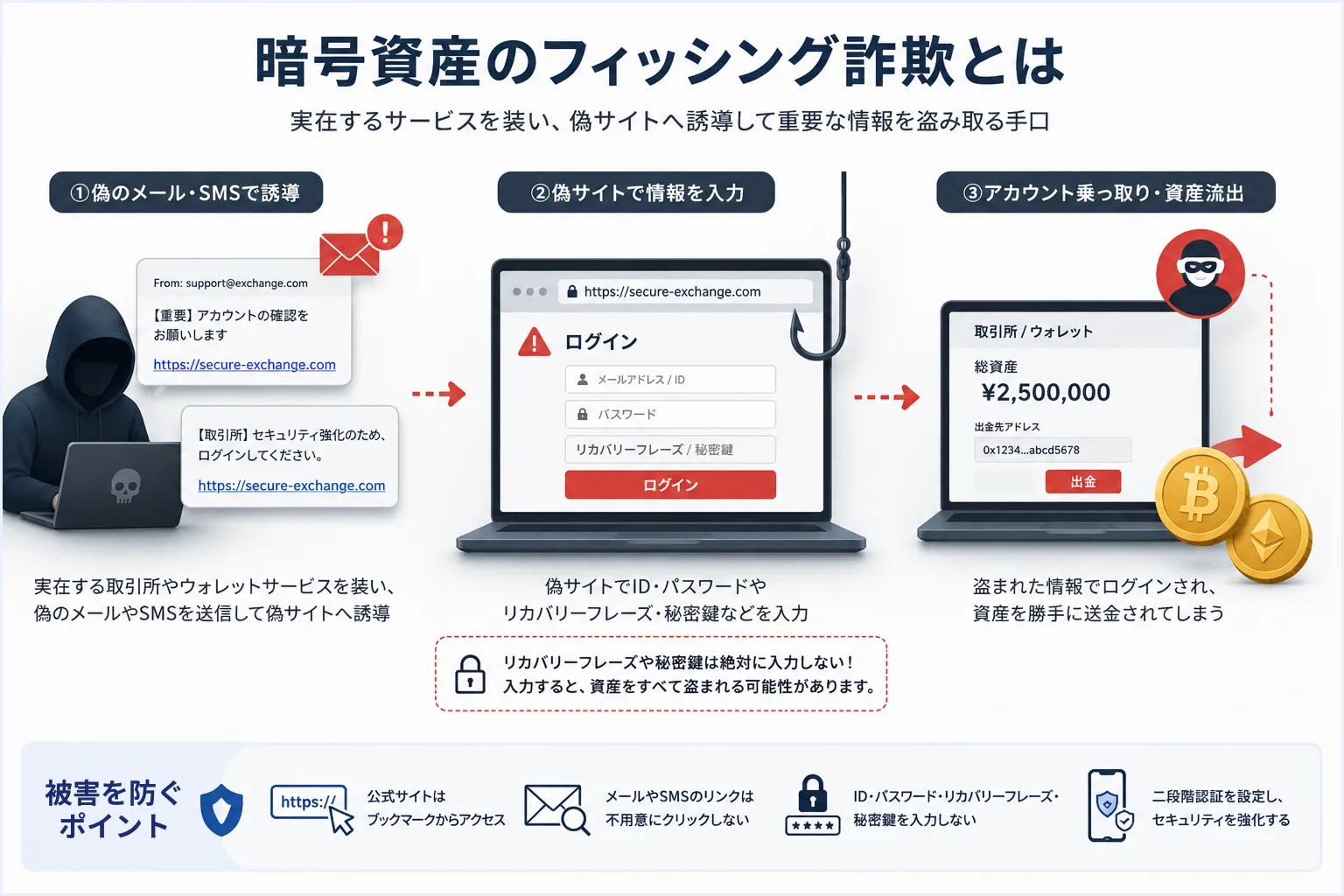
Crypto phishing is a scam in which criminals impersonate a real crypto asset exchange service provider or wallet service and lure victims to a fake site in order to steal sensitive information. Japan's National Police Agency (NPA) also warns about this on its official website, describing phishing as a scheme that impersonates a real service or company and uses fake emails or SMS messages to lure victims to a fake site to steal their ID and password (source: Phishing Countermeasures - National Police Agency (NPA) website).
With crypto assets, the damage is not limited to a hijacked exchange account. If you enter your wallet's recovery phrase or private key, a third party may be able to move the assets held in that wallet.
This is fundamentally different from a bank account login. With crypto assets, anyone who knows the private key or recovery phrase can move the funds, so this information must be kept strictly confidential from third parties.
Information Targeted in Crypto Phishing Scams
Crypto phishing scams mainly target exchange login credentials and critical wallet information. Both can lead to a loss of assets, but the way the damage occurs is different.
If your exchange (order-matching marketplace) login credentials are stolen, your account with the crypto asset exchange service provider could be accessed by an unauthorized third party. If your wallet's recovery phrase or private key (signature key) is stolen, on the other hand, your assets could be moved without ever going through the exchange.
Stolen exchange login credentials can lead to a hijacked account
If you enter your exchange ID or password on a fake site, a third party may be able to log in to your account. Because exchange accounts are used to trade and send crypto assets and manage your registered information, a hijacked account can result in your holdings being moved.
What's especially dangerous is when the attacker sends your crypto assets to an external wallet after logging in. Unlike a bank transfer or credit card payment, a crypto asset transfer generally cannot be reversed after the fact. Once funds are sent to an address controlled by the attacker, recovering them is very difficult.
Depending on the exchange, an attacker who has logged in may also be able to change your registered email address, withdrawal address, or security settings. Once these changes are made, it can become difficult for the account owner to log back in or even confirm the extent of the damage.
Even having two-factor authentication (2FA) enabled is not a guarantee of safety. If you enter a one-time password or authentication code on a fake site, the attacker can use that code immediately to complete an unauthorized login. In other words, 2FA is an effective safeguard, but it stops working as protection once you enter the code on a fake site.
For this reason, even if you receive an email or SMS from an exchange saying something like "We detected unauthorized login activity," "Your withdrawals have been restricted," or "Identity verification is required," do not log in through the link in that message. If you need to check something, always access your account through the official app or a bookmarked official website.
A stolen recovery phrase or private key can lead to your wallet's assets being moved
If you use a self-custody wallet, the most sensitive information you hold is your recovery phrase and private key. A recovery phrase is a set of words used to restore a wallet, and a private key (signature key) is the information required to move crypto assets on the blockchain.
If a third party learns this information, they can potentially restore the same wallet on a different device or a different wallet app. In other words, the attacker can access the assets in your wallet without ever touching your smartphone or computer directly.
If your recovery phrase or private key has been exposed, changing your exchange password will not protect your assets, because that response only applies to exchange accounts. Since the wallet's key itself is now known to someone else, the risk of your assets being moved again remains as long as you keep using the same wallet.
For this reason, you should never casually share your recovery phrase or private key, or enter it on a website. Even a legitimate support representative would not normally need to ask for this information, so please stay alert.
Common Tactics Used in Crypto Phishing Scams

Crypto phishing scams often work by making users feel rushed or by making them believe they stand to gain something, in order to lure them to a fake site. In the crypto space, the following entry points can lead to being scammed:
- Exchanges
- Wallets
- Airdrops
- Social media
- Search ads
Below are some of the most common tactics to watch out for.
Emails or SMS messages impersonating an exchange, leading to a fake site
One common tactic in crypto phishing is an email or SMS message impersonating a crypto asset exchange service provider that leads to a fake site. The message often includes language designed to create a sense of urgency, such as "We detected unauthorized login activity," "Identity verification is required," or "Your withdrawals have been restricted."
What makes this tactic dangerous is that users tend to assume "something has gone wrong with my assets" and click the link before calmly verifying it. Because crypto asset prices are volatile and involve sending and withdrawing funds, people tend to react quickly to anything that looks like a warning from an exchange.
The fake site the link leads to is often designed to closely resemble the real exchange, with a similar logo, color scheme, and login page layout, making it difficult to identify as fake based on appearance alone.
It is also worth noting that the content of these emails and SMS messages is often plausible enough to be genuine. For example, requests to resubmit identity verification, notices of enhanced security, changes to terms of service, or lifting of withdrawal restrictions are all things a real exchange might actually communicate, which makes it dangerous to judge whether a message is legitimate based on its wording alone.
Even when you receive an important notice from an exchange, avoid logging in through a link in that email or SMS message. If you need to check something, access your account through the official app or a bookmarked official website and check your notifications there. Simply changing how you access your account before clicking a link can meaningfully reduce the risk of being led to a fake site.
Fake wallet support leading users to enter their recovery phrase
If you use a self-custody wallet, you may run into issues such as the app not opening, your balance not displaying, or being unable to restore your wallet after switching devices. In moments like these, users who panic and search online or ask questions on social media risk being directed to a fake support channel.
Being unable to log in to your wallet makes it harder to think clearly. Because of the fear that "I might lose my assets," people sometimes follow instructions they would normally consider suspicious, believing them to be a necessary recovery step.
Even when you're stuck with a wallet issue or a failed restoration, do not immediately trust a support channel you found through a search engine or on social media. Confirm that the channel is one listed on the official website, and never share your recovery phrase or private key under any circumstances.
Fake airdrops or campaigns that get users to connect their wallet
Another tactic involves posing as a free distribution of crypto assets or NFTs to get users to connect their wallet to a fake site. An airdrop is a promotion in which crypto assets or tokens are distributed for free (related article: What Is an Airdrop? (in Japanese)).
Messages like "available for a limited time only" or "connect your wallet to receive it" are used to lure users in. Once connected, victims are often asked to complete a wallet connection or signature request and may end up approving something unfavorable without realizing it.
Connecting a wallet is not always the same as simply logging in. Depending on the content, it can grant permissions related to moving crypto assets or NFTs. As a general rule, you should not connect your wallet to a site you don't fully understand.
Fake sites reached through search ads or social media
Phishing scams don't only arrive by email or SMS; they can also be reached through search ads or social media. For example, searching for the name of an exchange or wallet may surface an ad or fake site designed to look like the real one. Ranking near the top of search results does not necessarily mean a site is legitimate.
On social media, scammers may also use account names and profile pictures similar to an official account to promote a fake campaign or fake support channel. Rather than judging based on follower count or display name alone, it's important to confirm that the account is the one listed on the official website.
How to Protect Yourself Against Crypto Phishing Scams

Trying to judge a suspicious email or screen on the spot is not enough to prevent crypto phishing scams. Fake sites are often built to closely resemble the real thing, which makes it difficult to judge their safety based on the logo or design alone.
What matters most is following a consistent, predetermined process every time you receive a suspicious message, rather than acting on the spot. Instead of rushing, carefully check each step: how you log in, where you enter information, and any situation where you're asked to connect your wallet.
This is especially important for crypto assets, since exchange account details and critical wallet information are involved. Because a single input or approval can result in your assets being moved, it's important to build habits that avoid dangerous actions in advance, rather than only responding after damage has occurred.
The rest of this section walks through concrete steps you can take to protect yourself against crypto phishing scams. As you read, think about your own login habits and wallet usage, and check whether your current approach to managing your assets has any gaps.
Never log in through a link in an email or SMS message
Even if you receive an email that appears to be from a crypto asset exchange service provider or wallet service, do not log in through the link in that message. Even if the link appears to lead to the real site, it may actually lead to a fake one. Be especially cautious if the message includes any of the following words:
- Urgent
- Suspended
- Restricted
- Unauthorized login
These kinds of expressions are sometimes used specifically to make users feel rushed and skip verification. If you need to log in, access your account through a bookmark you set up yourself or through the official app, rather than a link in an email. This one habit alone can significantly reduce the risk of being led to a fake site.
Access services only through the official website or official app
When using a crypto asset exchange service provider or wallet, it's important to access it through the official website or official app. Clicking a link shown in an ad or on social media carries the risk of being directed to a fake site designed to look like the real one.
When checking the official website, don't simply click the first search result for the service name; check the URL carefully. Fake domains sometimes swap out characters in the service name or add extra words to mimic the real domain. If a URL looks unfamiliar or doesn't exactly match the official service name, it's safer not to enter your login information.
A more reliable approach is to confirm the correct official website once, and then bookmark the login page. From then on, access the site through your own saved bookmark rather than a link from an email, SMS message, or search result. This reduces the risk of being directed to a fake site over time.
If you use an exchange on your smartphone, using the official app is another option. That said, apps with similar names can also appear in app store search results, so don't judge an app by its name alone. Check the developer's company name and confirm through the official website or a link already published on an existing official page before installing.
The same applies to wallet apps. Rather than installing directly from a link found in a search result or on social media, confirm it through the official website or a page linked by the developer. This is especially important for apps where you'll be entering your recovery phrase or private key, since a fake app can lead directly to a loss of assets.
Verify the other party's trustworthiness before sharing your recovery phrase
Your recovery phrase is critical information used to restore your wallet. If a third party learns it, they may be able to access your assets from a different device or wallet app, so as a rule, you should not share it casually.
That said, if you hire a professional recovery service for your wallet, sharing the recovery phrase can be a necessary part of the work in some cases. For example, if you're unable to restore your wallet on your own, the service may need to confirm your recovery phrase in order to determine which wallet is involved and proceed with the recovery.
As a general rule, a recovery phrase should not be shared. However, in cases where sharing it truly cannot be avoided, you should verify whether the party is a trustworthy business by checking their company information, contact details, track record, fee structure, and whether they clearly explain the scope of work.
Be especially cautious of anyone who suddenly contacts you through a social media DM, or an unfamiliar support channel you were directed to via a search ad. Never hand over your recovery phrase or private key to someone who pressures you with language like "we can recover it right away" or "please enter it now."
Even when requesting a recovery service, confirm in advance what information you'll need to share, how that information will be handled, and what security measures will be taken after recovery is complete. Given how sensitive a recovery phrase is, it's risky to make a request without first verifying the other party's trustworthiness.
After recovery, it's also worth considering moving your assets to a new wallet rather than continuing to use the same one. If you shared your recovery phrase with a third party during the recovery process, revisiting your overall management approach afterward can help reduce future risk.
Use a different password for each exchange
If you use multiple crypto asset exchange service providers, it's important to set a different password for each one. Reusing the same password across services means that if one service's data is leaked, other exchange accounts using the same password could also face unauthorized login attempts.
That said, setting a long, complex password for every exchange can make it difficult to remember and manage them all on your own. In that case, a password manager can help. Well-known options include Bitwarden and 1Password, which are used to securely store multiple passwords and make it easier to use a different password for each service.
The password itself should also avoid being easy to guess. Rather than a short, simple string, set a long, hard-to-guess password that's unique to each exchange.
Enable two-factor authentication to guard against unauthorized logins
When using a crypto asset exchange service provider, it's important to enable two-factor authentication (2FA). 2FA is a mechanism that verifies your identity using a code generated by an authenticator app, in addition to your ID and password.
With 2FA enabled, an unauthorized login may be prevented even if your ID and password alone are stolen. However, if you enter your 2FA code on a fake site, it can be used by the attacker.
For this reason, it's not enough to simply enable 2FA; you also need to be careful about where you enter the code. Only enter it on a screen you reached by logging in through the official app or official website, never through a screen opened from a link in an email or SMS message.
Check wallet connection and signature requests carefully
When using DeFi or NFT-related services, you also need to be careful about wallet connections and signature requests. DeFi (Decentralized Finance) is a system for conducting financial transactions on the blockchain without going through a financial institution such as a bank.
Connecting a wallet or signing a request is not always the same as simply logging in to a site. Depending on the content, it can grant permission to move your crypto assets or NFTs. As a general rule, don't connect your wallet to a site you don't fully understand, and don't approve a signature request without confirming exactly what it authorizes.
What to Do If You Fall Victim to a Phishing Scam

If you suspect you have been targeted by a phishing scam, the first priority is to stay calm and stop taking any further action. If you continue following on-screen instructions out of anxiety, you risk entering even more information or being led to yet another fake site. At this stage, it's important to organize the following details before deciding on your next step:
- Which site you accessed
- What information you entered
- What approvals or actions you took
Also be cautious about panicking and reaching out to a "recovery support" service found through a search result or on social media. Since scammers sometimes pose as recovery help to cause a second round of damage, choose who you consult and how you respond carefully.
The rest of this section explains, by situation, what to check if you suspect you've been targeted by a phishing scam.
If you entered your exchange login credentials, change them immediately
If you may have entered your crypto asset exchange service provider's ID or password on a fake site, change your password immediately through the official website or official app.
Avoid using a link in an email or SMS message to start the password change process.
At the same time, check your 2FA settings. Also confirm whether your registered email address, phone number, or withdrawal address have been changed.
If you find any unauthorized logins or withdrawal requests already in place, contact the exchange's support team right away. If possible, save screenshots of your login history and withdrawal history, as this will help when explaining the situation.
If you entered your recovery phrase or private key, move your assets to a different wallet
If you may have entered your crypto asset exchange service provider's ID or password on a fake site, first log in through the official website or official app and change your password.
After changing your password, check your 2FA settings as well. Confirm that 2FA hasn't been disabled and that no unfamiliar authentication method has been added. Also check whether your registered email address, phone number, or withdrawal address has been changed.
Pay particular attention to any change in your withdrawal address. If an attacker has registered an external wallet address, your crypto assets could be sent out fraudulently. Check whether you've received any notification about a withdrawal restriction or address registration, whether by email or within the exchange itself.
If you find any unauthorized login history or withdrawal requests already in place, contact the exchange's support team right away. It also helps to save your login history, withdrawal history, a record of any changes to your registered information, and any emails or SMS messages you received, as this makes it easier to explain the situation.
If unauthorized transfers have already occurred, save your transaction history
If your crypto assets have already been transferred fraudulently, first save your transaction history and any related screenshots. Once an unauthorized transfer has occurred, it's generally very difficult to reverse it, so it's important to preserve information that documents the extent of the damage.
Information worth saving includes the date and time of the transfer, the type and amount of crypto assets sent, the destination address, and the transaction ID. If the transfer originated from an exchange, it's also a good idea to save the exchange's withdrawal history, login history, and any suspicious notification emails.
A transaction ID is a unique identifier for a transaction on the blockchain. Having this information can help confirm which address the funds were sent to and whether the transaction has been finalized on the blockchain. It can also serve as supporting material when consulting the police or the exchange.
It's also worth keeping the phishing email or SMS message, the URL you accessed, and screenshots of the fake site. This information is useful for piecing together exactly how the scam happened.
Once a crypto asset transfer is completed, it generally cannot be reversed through action by the user alone. For this reason, once you notice you've been targeted, you should organize any evidence you have and be ready to consult the exchange or the police.
Contact the exchange or the police
If you believe you've fallen victim to a phishing scam, contact the crypto asset exchange service provider or wallet service you use. If an unauthorized login or unauthorized transfer has occurred on the exchange, an account suspension or additional verification may be required.
If you have suffered actual damage, it's also worth consulting your local police station or a cybercrime reporting channel. Japan's National Police Agency (NPA) also advises victims of phishing to report or consult through a police station or an online reporting channel.
- Where to report a phishing site you've discovered
- Where to report if you've fallen victim to phishing
When consulting these channels, it helps to organize the content of the email or SMS message, the URL you accessed, any information you may have entered, and your transaction history in advance. Preserve any screenshots that could serve as evidence rather than deleting them.
The Best Defense Against Crypto Phishing Is Simply Not Entering Your Information
When it comes to crypto phishing scams, relying solely on your ability to spot a fake site is risky. Because fake sites are built to closely resemble the real thing, judging safety by logo or design alone can be difficult.
That's why the single most important thing is to avoid entering sensitive information in the first place. Make it a firm habit never to log in to an exchange through a link in an email or SMS message, never to enter your recovery phrase or private key on a website, and never to connect your wallet to a site you don't fully understand.
Unlike a bank deposit, crypto assets are not backed by a central authority that can reverse every transaction on your behalf. This makes it especially important, particularly with self-custody wallets, to stay conscious of protecting your own private key and recovery phrase.
If you receive a suspicious email or SMS message, don't open the link right away — verify it through the official website or official app instead. Pausing before you enter any information, even when something feels only slightly off, is one of the most practical ways to protect your assets.
This article is for informational purposes only and does not constitute financial or investment advice. Please consult a qualified professional before making investment decisions.


